Created for math tutors, this Compass Tool add-on helps present geometry concepts clearly in both online and classroom environments.
It enables precise geometric constructions, allowing you to show students how circles, arcs, and construction lines connect within a problem.
Its interactive compass offers smooth radius control and natural arc drawing, giving tutors a realistic way to model geometric principles digitally.
How to use the Interactive Compass?
After ordering the Math Tools and receiving the activation email, a new f(x) icon will appear in the toolbar. If you don’t see it immediately, refresh or reload the page. Click the f(x) icon and enable the Compass to get started.
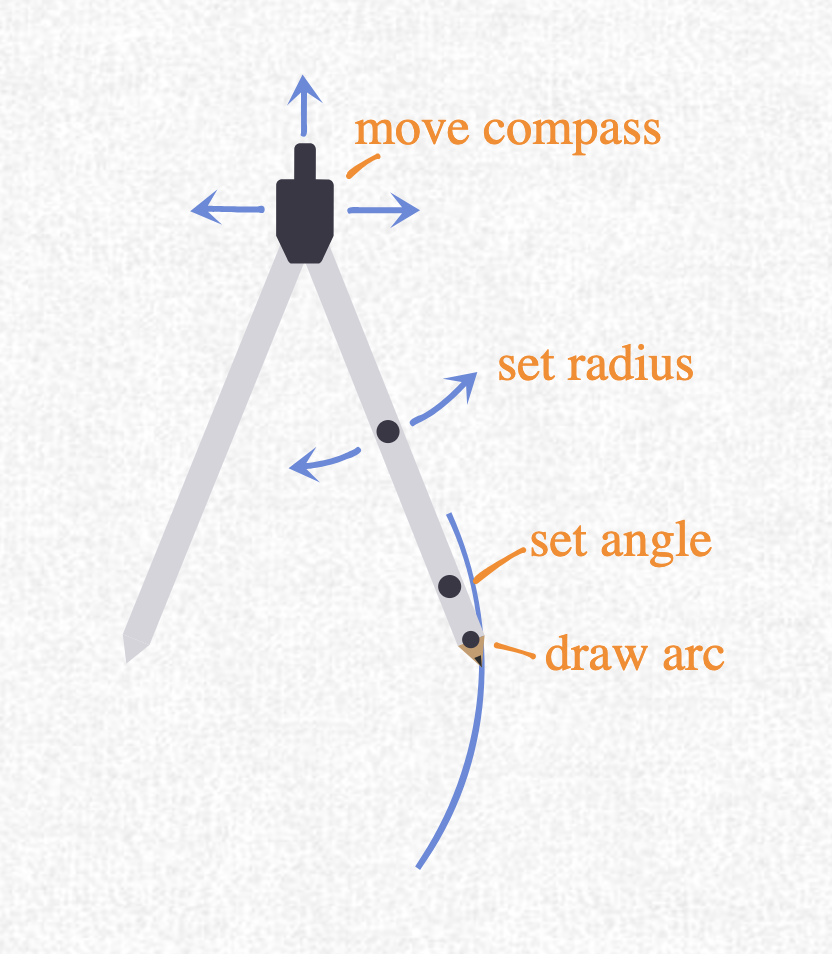
The compass has four black handlers, and each one controls a different part of the tool.
1. Top hinge — move the entire compass
Use the black dot at the very top to reposition the whole compass on the board. Drag it anywhere you want before starting your construction.
2. Middle handler on the right leg — set the radius
The black dot halfway down the right leg adjusts the spread of the compass. Moving it changes the radius and sets the size of the circle or arc you want to draw.
3. Drawing tip — create the arc or full circle
The lowest black dot on the right leg is the active drawing point. Drag it along its path to draw clean arcs or complete circles with the radius you set.
4. Guide tip — reposition the angle without drawing
Just above the drawing tip is another small black dot. It follows the same curved path as the drawing tip, but it does not draw. Use it to rotate the compass and precisely reposition the angle on the circle before you start drawing.
The Interactive Compass add-on in action: creating accurate circles and arcs for geometry constructions, ideal for math tutors teaching live or online.
How to Order the Math Tools
The Math Tools package is available exclusively to Pro users of Ziteboard. This package includes the Formula Editor and the Graph Plotter and the Interactive Compass. To unlock the Math Tools suite permanently, there is a one-time fee of $40.